
Tranzify
Payments infrastructure for the internet
Follow the guidance for setting up a connection with the Tranzify payment service provider.
Set Up Account
Step 1: Register your Tranzify account
Start with registration, contact the support team. Submit the required documents to verify your account and gain access.
Connect H2H Merchant Account
Step 1. Connect H2H account at the Corefy Dashboard
Press Connect at Tranzify Provider Overview page in 'New connection' and choose the H2H Merchant account option to open Connection form.
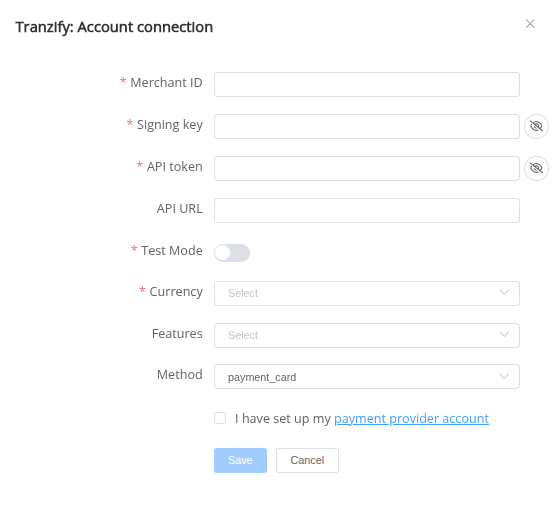
Enter credentials:
- Merchant ID → Merchant id (self defined, should be unique)
- Signing key → Key used to verify callback
- Api token → API token
- Currency → Currency for payments
- Api URL → Optional. Can be filled if url is different from default url
- Test Mode → true/false
Choose Currencies and Features. You can set these parameters according to available currencies and features for your Tranzify account, but it's necessary to verify the details of the connection with your Corefy account manager:
API examples:
Maximum data set to create a transaction
POST /api/payment-invoices HTTP/1.1

{
  "data": {
    "type": "payment-invoice",
    "attributes": {
      "service": "payment_card_usd_hpp",
      "currency": "EUR",
      "amount": 1,
      "customer": {
        "reference_id": "287e6567-3625-43f3-aac4-ff3002c6742d",
        "name": "Test TEST",
        "email": "test@mail.com",
        "phone": "+380970001122",
        "address": {
          "full_address": "Ukraine",
          "country": "UA",
          "region": "Ukraine",
          "city": "Ukraine",
          "post_code": "62000"
        }
      }
    }
  }
}
Minimum data set to create a transaction if the constants is set
POST /api/payment-invoices HTTP/1.1

{
  "data": {
    "type": "payment-invoice",
    "attributes": {
      "service": "payment_card_usd_hpp",
      "currency": "EUR",
      "amount": 1,
      "customer": {
        "reference_id": "6164d44c-10de-48cd-91a4-735fc7c64f58"
      }
    }
  }
}
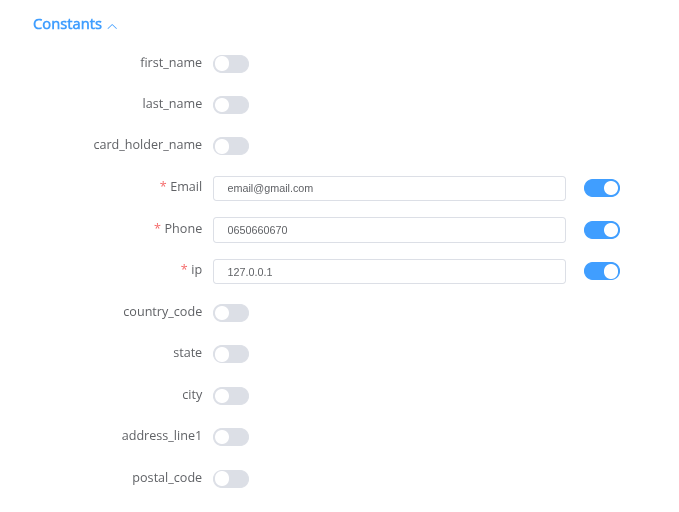
- reference_id → customer reference identifier
- first_name → customer first name
- last_name → customer last name
- card_holder_name → card holder full name
- email → customer email address
- phone → customer phone number
- ip → customer IP address
- country_code → customer country code (ISO 3166-1 alpha-2)
- state → customer state or region
- city → customer city
- address_line1 → customer primary street address
- postal_code → customer postal code
Success
You have connected Tranzify H2H merchant account!
Still looking for help connecting your Tranzify account?