
Slikair
Payment acceptance through Slikair V2 API
Website: slikair.online
Login: Provider Dashboard
API documentation: Blocksystems API DOC - V2
Follow the guidance for setting up a connection with Slikair payment service provider.
Set Up Account
Step 1: Contact Slikair support manager
Contact your Slikair account manager and request access to the V2 API.
Step 2: Get credentials
Credentials that have to be issued:
- merchant_id → Merchant ID
- Merchant identifier provided by Slikair.
- merchant_site_id → Merchant Site ID
- Site identifier for multi-site merchants.
- merchant_token → Merchant Token
- Token used in the
merchant-tokenrequest header.
- Token used in the
- api_url → API URL
- Optional production API URL. If empty, connector uses
https://slikair.online/api/v2.
- Optional production API URL. If empty, connector uses
Connect Merchant Account
Step 1. Connect account at the Corefy Dashboard
Press Connect at Slikair Provider Overview page in 'New connection' section and choose H2H Merchant account option to open Connection form.
Step 2. Enter credentials
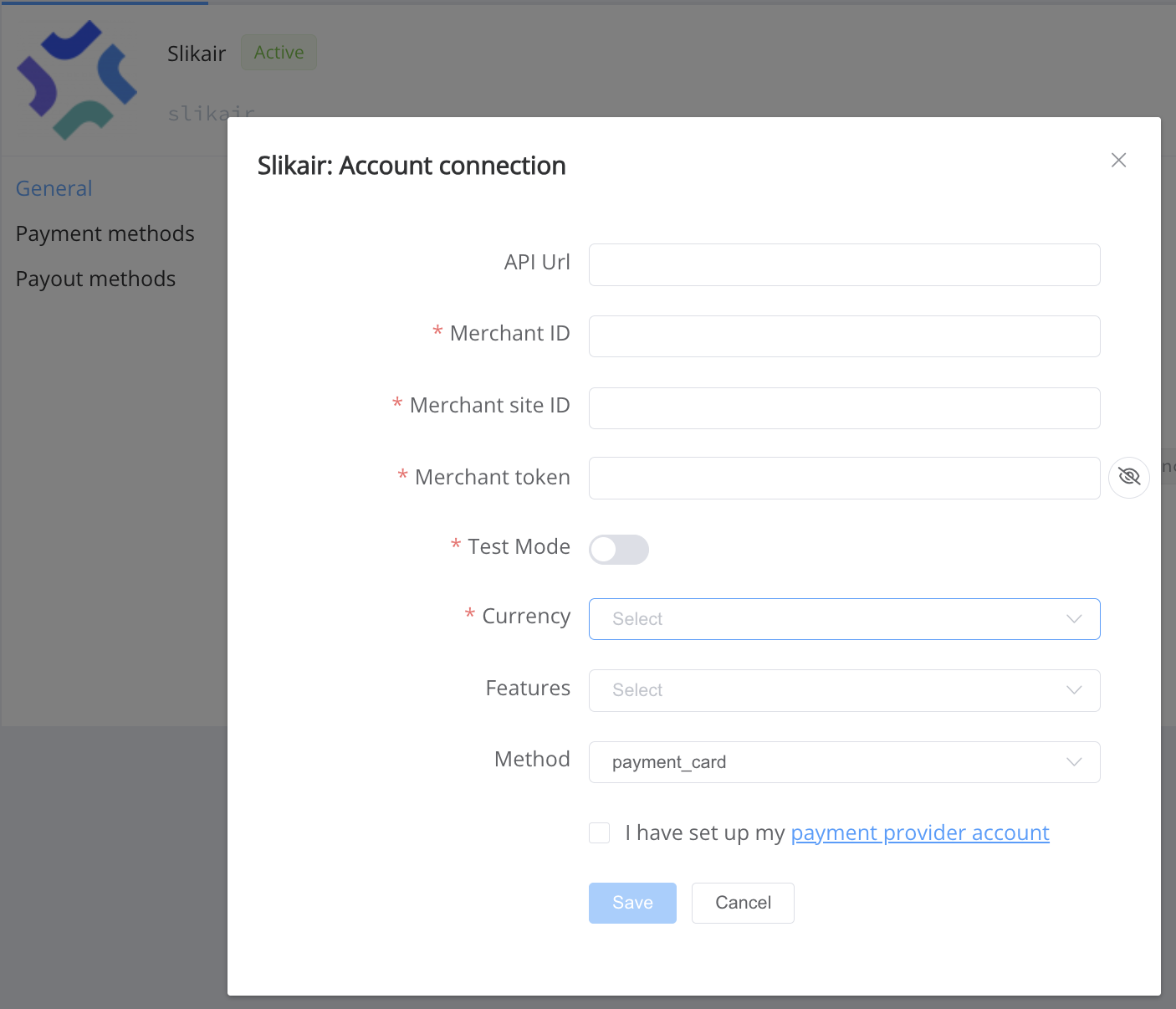
Enter credentials:
- API URL
- Enter custom production API URL (
api_url) only if Slikair provided a custom URL. - Leave empty to use the default production URL.
- Enter custom production API URL (
- Merchant ID
- Enter
merchant_id.
- Enter
- Merchant Site ID
- Enter
merchant_site_id.
- Enter
- Merchant Token
- Enter
merchant_token.
- Enter
-
Test Mode -> false
-
Method -> payment_card -> (credit_card (Provider internal value))
Supported initial currencies: * EUR * USD * GBP * AUD * CAD
Success
You have connected Slikair H2H merchant account!
Connector Capabilities
The Slikair connector supports:
- Sale
- Reconcile
- Callback processing
API examples
Minimum data set to create a payment invoice for Slikair payment card service
PAYMENT
POST /api/commerce/payment-invoices HTTP/1.0
{
  "data": {
    "type": "payment-invoice",
    "attributes": {
      "service": "payment_card_eur_hpp",
      "commerce_account": "coma_CbSYP561QYj3wtx0",
      "currency": "EUR",
      "amount": 16.5,
      "reference_id": "b1e3db21-e459-440b-95b1-b4958e646ba1",
      "flow": "charge",
      "gateway_options": {
        "cardgate": {
          "tokenize": false
        }
      },
      "customer": {
        "reference_id": "123"
      },
      "callback_url": "http://diclinous-wholesomely-mao.ngrok-free.dev",
      "test_mode": false,
      "options": {
        "allow_partially": false,
        "bypass_hpp": false,
        "send_operation_context_on_return": false
      },
      "service_fields": []
    }
  }
}
Still looking for help connecting your Slikair account?