
Safegatepayments
Set up Account
Step 1: Get required credentials
Credentials that have to be issued:
- Api key
Connect Provider Account
Step 1. Connect Provider account at the Corefy Dashboard
Press Connect at Safegatepayments Provider Overview page in 'New connection' section and choose Provider account option to open Connection form.
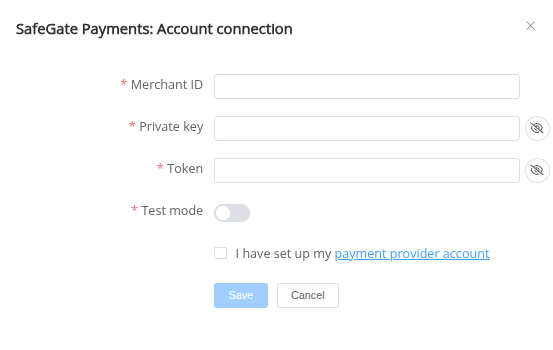
Enter credentials:
- Merchant ID → unique Merchant identifier generated by merchant
- Private key → secret key for callback
- Token → Bearer token for request
- Test Mode → true/false
Success
You have connected Safegatepayments Provider account!
API examples
Data set to create a Payment:
POST /api/commerce/payment-invoices HTTP/1.1
{
  "data": {
    "type": "payment-invoice",
    "attributes": {
      "service": "bank_transfer_try_invoice",
      "fields":{
        "account_number":"AccessBank",
        "beneficiary_account_number":"1234567890",
      },
      "commerce_account": "Hello_World",
      "currency": "TRY",
      "amount": 100,
      "flow": "charge",
      "customer": {
        "reference_id": "cff9b603-8c74-454f-9b66-73f349f12aec",
        "name":"John Doe",
        "date_of_birth": "2000-05-25",
      },
      "return_url": "https://test.com/default",
      "return_urls": {
        "fail": "https://test.com/fail",
        "success": "https://test.com/success"
      },
      "test_mode": false,
      "reference_id": "bb756e15-428b-47f8-81dd-90014d5eb607"
    }
  }
}
Here is a list of Options with their corresponding parameters:
- seconds_to_expire → Seconds to expire transaction status. If empty - default value "360" will be passed
Question
"Still looking for help connecting your Safegatepayments account?" Please contact our support team!