
FinAxis
FinAxis is a leading provider of specialized payment gateways for high-risk businesses.
Website: finaxis.cloud
Set up Account
Step 1: Create merchant account
To create an account, contact your FinAxis manager and submit the required documents to verify your account and gain access.
Step 2: Get required credentials
Credentials that have to be issued:
finaxis__api_key→ API keyfinaxis__secret_key→ Secret keyfinaxis__currency→ Currency
If your FinAxis setup uses a dedicated endpoint, you can also specify finaxis__api_url. When it is empty, the connector uses the default production URL https://api.finaxis.vip.
Connect H2H Merchant Account
Step 1. Connect H2H account at the Corefy Dashboard
Press Connect at FinAxis Provider Overview page in 'New connection' section and choose H2H Merchant account option to open Connection form.
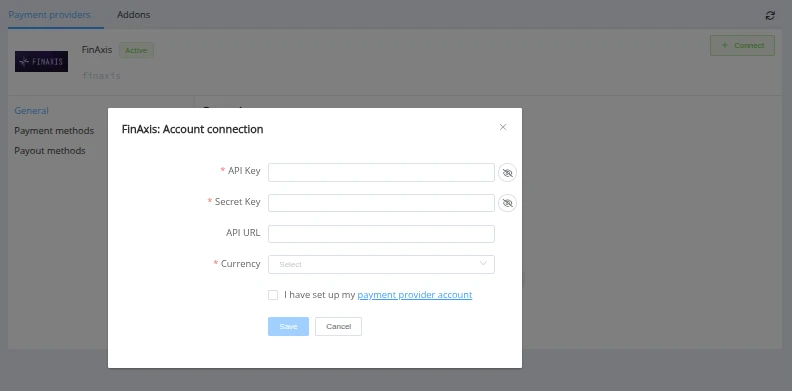
Enter credentials:
- API key →
api_key - Secret key →
secret_key(used to sign requests and verify callbacks) - Currency → choose the account currency (set this parameter according to the currency agreed with FinAxis for your account)
- API URL → fill in
api_urlonly if FinAxis shared a custom endpoint; otherwise leave empty to use the default production URL
Supported account currencies:
- ARS
- AUD
- INR
- NPR
Success
You have connected FinAxis H2H merchant account!
Connector Capabilities
The FinAxis connector supports:
- Sale (display-requisites invoice flow — the customer transfers funds to the bank requisites returned by FinAxis)
- Payout
- Reconcile (payment and payout)
- Callback processing (payment and payout)
- Balance
Pay-in services per currency
| Currency | Service |
|---|---|
| ARS | bank_transfer_ars_invoice |
| AUD | pay_id_aud_invoice |
| INR | upi_inr_invoice |
| NPR | esewa_npr_invoice |
Payment confirmation (INR, NPR)
For INR and NPR the customer must confirm the transfer after paying — they submit the payment reference (and sender details for NPR). The connector sends this to FinAxis via the update-invoice step. Confirmation fields:
- INR →
last_n_digits(UTR / transaction reference) - NPR →
sender_name,sender_wallet,last_n_digits
API examples:
Minimum data set to create a transaction
SALE

POST /api/payment-invoices HTTP/1.1

{
  "data": {
    "type": "payment-invoice",
    "attributes": {
      "service": "bank_transfer_ars_invoice",
      "currency": "ARS",
      "amount": 1000,
      "customer": {
        "reference_id": "85af8385-d00e-4f58-ab1f-3a527fdf2d3b"
      },
      "test_mode": false
    }
  }
}
Maximum data set to create a transaction
SALE

POST /api/payment-invoices HTTP/1.1

{
  "data": {
    "type": "payment-invoice",
    "attributes": {
      "reference_id": "1f2aa3ca-abd8-4741-980d-4017ed30cb8c",
      "service": "bank_transfer_ars_invoice",
      "currency": "ARS",
      "amount": 1000,
      "customer": {
        "reference_id": "85af8385-d00e-4f58-ab1f-3a527fdf2d3b",
        "name": "John Doe",
        "email": "johndoe@email.com",
        "phone": "+2134234234523",
        "address": {
          "full_address": "123 Baker street",
          "country": "AR",
          "state": "B",
          "city": "Buenos Aires",
          "post_code": "1000"
        }
      },
      "test_mode": false
    }
  }
}
Payout (POG)
Payouts are processed by the same FinAxis H2H merchant account. The set of recipient fields differs per currency and is passed in fields when creating a payout invoice.
Payout services and recipient fields per currency
| Currency | Service | Recipient fields (fields) |
|---|---|---|
| ARS | bank_transfer_ars | bank_account |
| AUD | bank_transfer_aud | one of bank_account / beneficiary_phone, plus bank_branch, beneficiary_email |
| INR | bank_transfer_inr | account_number, beneficiary_name, ifsc |
| NPR | bank_transfer_npr | account_number, beneficiary_name |
API examples
ARS payout
PAYOUT

POST /api/payout-invoices HTTP/1.1
{
  "data": {
    "type": "payout-invoice",
    "attributes": {
      "service": "bank_transfer_ars",
      "currency": "ARS",
      "amount": 1000,
      "test_mode": false,
      "fields": {
        "bank_account": "0000003100010000000001"
      }
    }
  }
}
AUD payout
Pass only one of bank_account or beneficiary_phone (whichever applies), plus bank_branch and beneficiary_email.
PAYOUT

POST /api/payout-invoices HTTP/1.1
{
  "data": {
    "type": "payout-invoice",
    "attributes": {
      "service": "bank_transfer_aud",
      "currency": "AUD",
      "amount": 100,
      "test_mode": false,
      "fields": {
        "bank_account": "12345678",
        "bank_branch": "062000",
        "beneficiary_email": "receiver@email.com"
      }
    }
  }
}
INR payout — UPI
PAYOUT

POST /api/payout-invoices HTTP/1.1
{
  "data": {
    "type": "payout-invoice",
    "attributes": {
      "service": "bank_transfer_inr",
      "currency": "INR",
      "amount": 500,
      "test_mode": false,
      "fields": {
        "account_number": "1234567890",
        "beneficiary_name": "Rahul Sharma",
        "ifsc": "HDFC0001234"
      }
    }
  }
}
NPR payout — Esewa
PAYOUT

POST /api/payout-invoices HTTP/1.1
{
  "data": {
    "type": "payout-invoice",
    "attributes": {
      "service": "bank_transfer_npr",
      "currency": "NPR",
      "amount": 500,
      "test_mode": false,
      "fields": {
        "account_number": "9812345678",
        "beneficiary_name": "Ram Bahadur"
      }
    }
  }
}
Additional information
Currency
The account currency is fixed per connection (currency field) and cannot be changed after the account is created. Create a separate connection per currency if you need to process several of them.
Question
"Still looking for help connecting your FinAxis account?"