
Dragontech
Website: https://www.dragontech88.com
Set up Account
Step 1: Create Provider account
Step 2: Get required credentials
Credentials that have to be issued:
- Merchant ID
- Secret key
- Payment provider account
Connect Provider Account
Step 1. Connect Provider account at the Corefy Dashboard
Press Connect at WorldPay Provider Overview page in 'New connection' section and choose Provider account option to open Connection form.
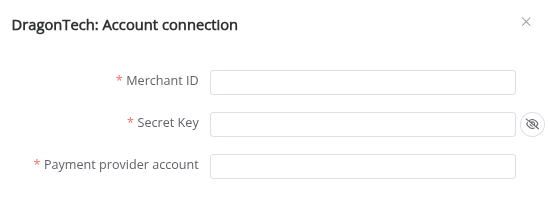
Enter credentials:
- Merchant ID
- Secret key
- Payment provider account
Success
You have connected WorldPay Provider account!
API examples:
Minimum data set to create a transaction for SALE
POST /api/commerce/payment-invoices HTTP/1.0
{
  "data":{
    "type":"payment-invoice",
    "attributes":{
      "metadata":{
      },
      "service":"payment_card_eur_hpp",
      "commerce_account":"coma_GJ0QnjW7SXIJWa8L",
      "currency":"EUR",
      "amount":26.9,
      "reference_id":"cf58dbc1-5cf8-4622-8695-ef0d9595efae",
      "flow":"charge",
      "gateway_options":{
        "cardgate":{
          "tokenize":""
        }
      },
      "customer":{
        "reference_id":"66ddb3c7553ce85a2cd5d810",
        "metadata":{
          "client_ip":"3.65.180.235"
        }
      },
      "test_mode":true,
      "options":{
        "allow_partially":false
      },
      "service_fields":[
      ]
    }
  }
}
Maximum data set to create a transaction for SALE
POST /api/commerce/payment-invoices HTTP/1.0
{
  "data":{
    "type":"payment-invoice",
    "attributes":{
      "metadata":{
        "some_data_needed_for_PPA":"test",
      },
      "service":"payment_card_eur_hpp",
      "commerce_account":"coma_GJ0QnjW7SXIJWa8L",
      "currency":"EUR",
      "amount":32,
      "reference_id":"4f9bd168-3ad0-4177-8ba9-7f5997927564",
      "flow":"charge",
      "gateway_options":{
        "cardgate":{
          "tokenize":""
        }
      },
      "customer":{
        "reference_id":"8c5a4832-45fc-49ad-bb8f-f38a4c46c685",
        "name":"John Wick",
        "email":"test@test.com",
        "phone":"445556667788",
        "date_of_birth":"2000-02-01",
        "address":{
          "country":"AW",
          "city":"City",
          "street":"Street",
          "post_code":"Postcode"
        },
        "metadata":{
          "client_ip":"3.65.180.235"
        }
      },
      "test_mode":true,
      "options":{
        "allow_partially":false
      },
      "service_fields":[
      ]
    }
  }
}
Constants
If some parameters are not sent in the transaction creation request, they will take the values from the set constants.
Here is a list of constants with their corresponding parameters:
- CUSTOMER_ID → customer [reference_id]
- COUNTRY → customer [address] [country]
- CITY → customer [address] [city]
- POST_CODE → customer [address] [post_code]
- FULL_NAME → customer [address] [full_name]
- FIRST_NAME → customer [address] [first_name]
- LAST_NAME → customer [address] [last_name]
- EMAIL → customer [address] [email]
- PHONE → customer [address] [phone]
- BIRTH_DATE → customer [date_of_birth]
- IP → customer [metadata] [ip]
Provider Options Payment

- Finalize fail transactions to fail
- In exceptional cases, a transaction may change from a failed status to another status. Therefore, aside from this exceptional scenario, a transaction with a final failed status will not transition to any other state.
Still looking for help connecting your Dragontech account?