
Clear Junction
Accounts and local rails for financial institutions
Supports in this guide: Payments | Payouts
Provider website: clearjunction.com
What you need to do for start processing transactions (brief summary)
- Choose account type
- Get your credentials (from Clear Junction)
- Connect in Dashboard
- Send an API request
Choose account type
Clear Junction can be connected in different ways (depending on your needs):
- If you do payouts (SEPA bank transfers in EUR) -> choose Provider account
- If you do payments (bank transfer by invoice in EUR) -> choose Provider account
If you are not sure which one to use, confirm with your Corefy account manager.
Prerequisites: get from Clear Junction
Get the following values for your Clear Junction project/account:
- API Key -> Corefy field
api_key-> example:a1b2c3d4-e5f6-7890-abcd-ef1234567890-> used to identify and sign every request to Clear Junction -> where to find: Clear Junction backoffice / issued by Clear Junction manager - API Password -> Corefy field
api_password-> example:s3cr3tP@ssw0rd-> used together with the API Key to sign requests -> where to find: Clear Junction backoffice / issued by Clear Junction manager - Wallet ID -> Corefy field
wallet_uuid-> example:9f8e7d6c-5b4a-3210-fedc-ba9876543210-> the Clear Junction wallet used for balance requests -> where to find: Clear Junction backoffice / issued by Clear Junction manager
Payments processing (connect Provider account, create payment-invoice)
Connect Provider account in Corefy Dashboard
Step 1 - Open connection form
Open Clear Junction in the provider directory and press Connect at Clear Junction Provider Overview page in the New connection section. Choose Provider account.
Step 2 - Fill in fields and select settings
- API Key ->
api_key - API Password ->
api_password - Wallet ID ->
wallet_uuid - Test Mode -> (enable if you are using sandbox credentials)
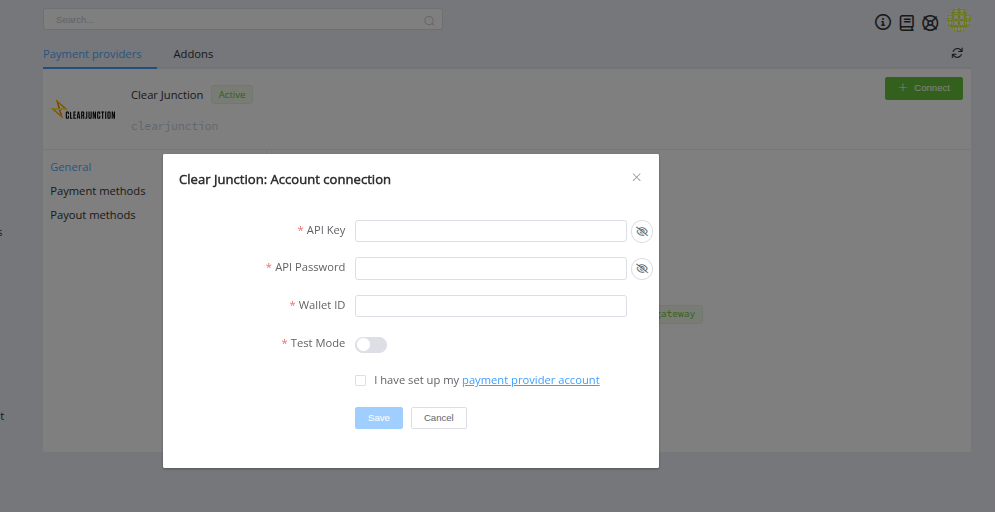
Choose Currency and Features. You can set these parameters according to available currencies and features for your Clear Junction account, but it is necessary to check details of the connection with your Corefy account manager.
Success
You have connected Clear Junction Provider account!
First request to Corefy API
What it does: creates a payment-invoice. The customer is shown bank details (taken from the route constants, see below) and a payment reference, and then makes a bank transfer.
Actual
POST /api/payment-invoices
{
  "data": {
    "type": "payment-invoice",
    "attributes": {
      "service": "bank_transfer_eur_invoice",
      "currency": "EUR",
      "amount": 100
    }
  }
}
Clear Junction doesn't use any customer data for this flow, so the minimal and extended requests are the same.
Options
Options are configured on the Corefy side and affect how Corefy builds provider requests or processes responses.
Currently available options (1)
time_to_pay- how long (in seconds) the customer has to make the bank transfer before the payment expires.
time_to_pay
What it does: sets the payment lifetime in seconds. If no matching incoming transfer is received from Clear Junction within this time, Corefy marks the payment as expired.
When to use: set it when unpaid invoices should expire after a fixed period (for example, 604800 for 7 days).
Default: not set - the payment stays pending until a matching transfer is received.
Allowed values: a whole number of seconds (digits only)
Constants (bank details for the payment page)
For the bank_transfer_eur_invoice route, constants hold the bank details of the account that receives the customer's transfer. Corefy shows these details to the customer on the payment page, together with the payment reference.
After the successful connection, fill in the constants for the route in the editing menu. All of them are required.
Currently available constants (constant -> shown on the payment page as)
iban-> IBAN of the receiving accountbic-> BIC of the receiving bankbank-> bank namebank_address-> bank addressaccount_holder_name-> account holder nameaccount_holder_address-> account holder address
Payouts processing (connect Provider account, create payout-invoice)
Connect Provider account in Corefy Dashboard
Step 1 - Open connection form
Open Clear Junction in the provider directory and press Connect at Clear Junction Provider Overview page in the New connection section. Choose Provider account.
Step 2 - Fill in fields (provider -> Corefy)
- API Key ->
api_key - API Password ->
api_password - Wallet ID ->
wallet_uuid - Test Mode -> (enable if you are using sandbox credentials)
Success
You have connected Clear Junction Provider account!
First request to Corefy API (MIN)
What it does: creates a payout-invoice.
Payout - MIN
POST /api/payout-invoices
{
  "data": {
    "type": "payout-invoice",
    "attributes": {
      "service": "bank_transfer_eur",
      "currency": "EUR",
      "amount": 100,
      "customer": {
        "reference_id": "8a033b30-f7e6-451d-9b58-4100eec1884c",
        "name": "John Doe"
      },
      "fields": {
        "account_number": "DE89370400440532013000"
      }
    }
  }
}
fields.account_number is the beneficiary's IBAN. customer.name is required: Corefy splits it into the beneficiary's first and last name, and fails the payout before calling Clear Junction if it's missing.
Payout - MAX
POST /api/payout-invoices
{
  "data": {
    "type": "payout-invoice",
    "attributes": {
      "service": "bank_transfer_eur",
      "currency": "EUR",
      "amount": 100,
      "customer": {
        "reference_id": "8a033b30-f7e6-451d-9b58-4100eec1884c",
        "name": "John Doe"
      },
      "fields": {
        "account_number": "DE89370400440532013000",
        "payment_purpose": "Withdrawal for order 12345"
      }
    }
  }
}
fields.payment_purpose is sent to Clear Junction as the payout description. If it isn't provided, Corefy uses the payout ID instead.
Extended request (MAX)
Why add extra fields (typical reasons):
- Provide additional customer details for compliance/reconciliation
- Positively influence conversion rate
- Include optional fields required by your specific flow
Options
Options are configured on the Corefy side and affect how Corefy builds provider requests or processes responses.
Currently available options (1)
use_provider_validation- cleans the beneficiary name and payout description so they match the characters Clear Junction accepts.
use_provider_validation
What it does: before the payout is sent, Corefy removes characters that Clear Junction doesn't accept. From the payout description, it removes everything except Latin letters, digits, spaces and / - ? : ( ) . ,. From the beneficiary's first and last name, it removes everything except Latin letters, spaces and - . '.
When to use: enable it if payouts are rejected by Clear Junction because of unsupported characters in the beneficiary name or the payment purpose.
Default: false
Allowed values: true / false
Constants
Constants are static values that Corefy sends to the provider for the route.
After the successful connection, fill in the constants for the bank_transfer_eur route in the editing menu.
Currently available constants (constant -> Clear Junction request field)
payer_iban(optional) ->payerRequisite.iban- IBAN of your Clear Junction account that the payout is sent from. It is sent for SEPA Instant payouts only.
Additional info
-
For payment callbacks, set up the callback URL on the Clear Junction side (backoffice or via your Clear Junction manager). The endpoint is
/clearjunction/callback. For payouts, Corefy sends the callback URL with every payout request, so no setup is needed. -
Clear Junction matches an incoming bank transfer to a payment by the payment reference shown on the payment page. The customer must enter this reference as the purpose of payment exactly as shown, otherwise the payment can't be matched.
FAQ / Troubleshooting
- Invalid credentials / auth error -> verify the API Key and API Password, and that Test Mode matches the credentials (sandbox vs production)
- Currency or service is not supported -> Clear Junction supports EUR only in this integration (
bank_transfer_eur_invoicefor payments,bank_transfer_eurfor payouts) - Payout fails with "Account number (iban) is required" or "Customer first name and last name are required" -> provide
fields.account_numberandcustomer.namein the payout request - Payout fails with "The received account number is incorrect" -> the beneficiary IBAN can't receive SEPA or SEPA Instant transfers; check the IBAN
- Payment stays pending -> check that the customer used the payment reference as the purpose of payment and that the callback URL is set up on the Clear Junction side
- Not sure which account type to use? -> ask your Corefy account manager
Question
Still looking for help connecting your Clear Junction account? Please contact our support team!