
Axipays
Website: https://axipays.com/
Set up Account
Step 1: Create H2H Merchant account
Step 2: Get required credentials
Credentials that have to be issued:
- Merchant ID (optional)
- Access token
- Signature token
Connect Provider Account
Step 1. Connect Provider account at the Dashboard
Press Connect at page in 'New connection'.
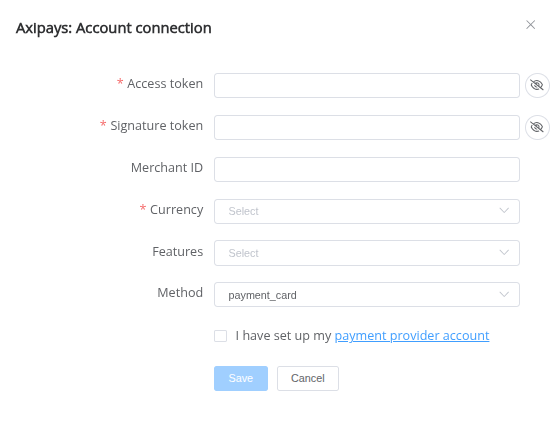
Enter credentials:
- Merchant ID
- Access token
- Signature token
Success
You have connected Axipays Provider account!
API examples:
Minimum\Maximum data set to create a transaction for SALE
SALE

POST /api/payment-invoices HTTP/1.1

{
  "data": {
    "type": "payment-invoice",
    "attributes": {
      "reference_id": "1f2aa3ca-abd8-4741-980d-4017ed30cb8c",
      "service": "payment_card_eur_hpp",
      "currency": "EUR",
      "amount": 5,
      "customer": {
        "reference_id":"8c5a4832-45fc-49ad-bb8f-f38a4c46c685",
        "name":"John Wick",
        "email":"test@test.com",
        "phone":"445556667788",
        "address": {
          "full_address":"test street 123",
          "country":"AW",
          "city":"City",
          "street":"Street",
          "post_code":"Postcode"
        }
      },
      "test_mode": false
    }
  }
}
Still looking for help connecting your Axipays account?